Posts
Don't Get Fooled by Numbers!
Fellas, Just wanted to share a story that’s been bugging me for days. Last week, I had the opportunity to attend a presentation by a vendor (unfortunately, for certain reasons, I can’t mention the name). Basically, they’ve been developing a web-based app specifically for tagging purposes (I can’t go into more detail). I was hooked by the concise yet appealing presentation until...they started showcasing a machine learning model they had built to perform the tagging task. The tagging, simply put, is a text classification task with multi-label output (a text can be classified into more than one label at the same time). They claimed the model had been performing consistently well, demonstrating the usual metrics: accuracy, precision, recall, and F1-score. All the scores were above 94%, which left some of my colleagues in awe. This is where I started to smell something fishy. I began asking multiple questions to confirm my suspicion. Starting with the dataset they used, then moving on to h...
How to Mount Your Google Drive on Google Colab

Easy peasy! 1. Use Google Package and put the following lines inside your Colab Workspace 2. A new authentication dialogue will be popped in. Select your respective Google account and press continue button until the dialogue disappears 2. You will return to your Colab workspace and Voila! Happy working!
Regex: Substitution

Suppose we have an original string to be manipulated, namely test . In this particular case, we will find all matching pattern (all words follow by dot character) and replace the dot with a versatile symbol (or a hashtag, "#").
Creating Python Virtual Environment: How-to

Hi all, In this posting, I'm going to show how we can create a Python virtual environment using Windows Command Prompt (CMD). Here's the plan. I'm going to create a new folder named upwork where I will store all documents and source codes from Upwork projects. In this upwork folder, I will create a new python virtual environment named vupwork. I'm using Windows Command Prompt but I'm sure there will be more similar tutorials for you, non-windows users. Let's dive in! 1. Create your first virtual environment. The command would be in the following form: python[python_version] -m venv [your_venv_name] 2. Now, activate the newly created virtual environment using the following command: [your_venv_name]\Scripts\activate 3. Now, as your virtual environment is already activated, you may want to install some packages using pip. Let's try to add pandas! pip install [packages_to_be_installed] 4. Last thing: deactivate your virtual environment using the deacti...
A Power BI Report from 2023's Data Warehouse Distance Learning (PJJ Data Warehouse)
I'm new to this visualisation area, let alone visualisation in Power BI. Despite lacking of practical experience in this area, I managed to get the opportunity to be an instructor in a distance learning where I was assigned to share a how-to in generating reports and dashboards using Power BI. The following report is based on the famous Sakila dataset . Any feedback is welcomed! 😃
DBeaver / PostgreSQL: "Error: database already exists" Workaround
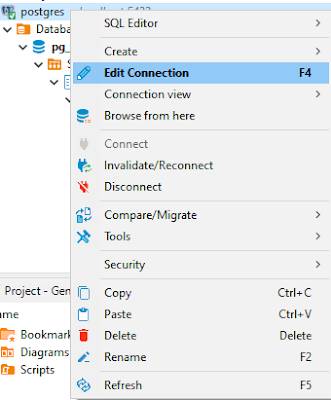
Recently, I encountered an error, saying: "Error: database already exists" This error came up when I thought the database I was trying to search was missing. So, I tried to create another new database with the same name. It's quite strange as on the Database Navigator pane at Dbeaver, the database remains hidden somewhere and the annoying this is we cannot create a new one. So, as always, I looked up Stackoverflow and find the workaround was rather simple. Right-click on the connection and fire Edit Connection Head to the PostgreSQL tab and make sure to tick the Show all databases on Click OK Problem solved! Credit to: oluwasegun for his response on the following StackOverflow thread: https://stackoverflow.com/questions/61979762/dbeaver-postgresql-error-database-already-exists-but-i-cant-find-it